Report app for floor layers and tilers
Which floor covering is in which room and whether it was glued or laid floating is recorded in the day's report. Even when the client asks two years later.
Area, covering, laying method
The «Floor layer / Tiler» profile brings three fields into the report. The laying method is a choice, so that everyone in the team names it the same way.
The area laid that day.
Product and finish, for example «Oak oiled 14 mm» or «Porcelain stoneware 60×60».
How it was laid — chosen with one tap.
Room by room
Before laying, the preparation counts; afterwards, the result. Both belong in the report.
-
Photos before laying
The employee photographs the screed, edge strips and the moisture meter reading in the report before the covering hides everything.
-
Adhesive and skirting
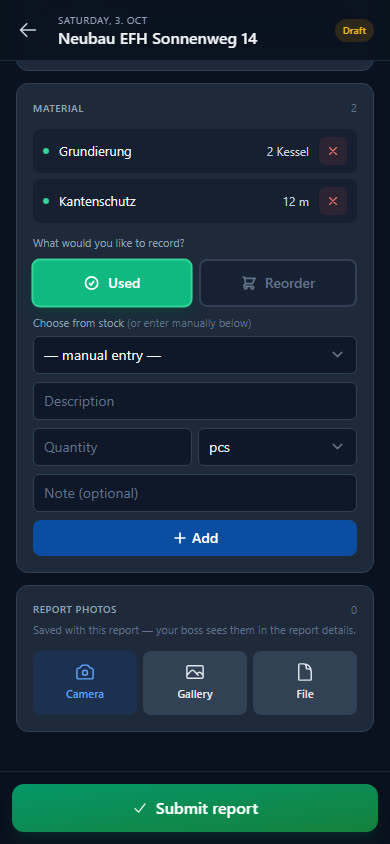
The employee chooses floor adhesive, grout and skirting boards from stock. If ten boards are missing, they report them in the report for reordering.
-
Add it later if it got late
Not every day ends with time for the report. It can be added up to 60 days back.
-
Remaining work on the checklist
Whatever is still open — a transition profile, a silicone joint — the employee adds as a new item to the site checklist.
Seven items to get started
Floor adhesive, grout, impact sound insulation in m² and skirting boards as consumables, utility knife and B3 notched trowel as tools, plus knee pads as PPE. The floor adhesive starts with a minimum stock of 5 bags.
- Floor adhesive 15kg
- Grout grey
- Impact sound insulation
- Skirting boards 240cm
- Utility knife + blades
- Notched trowel B3
- Gel knee pads
Checklist per site
What needs doing on site is listed as a checklist on the site — your workers tick it off in the report. For example:
- Screed moisture measured
- Edge insulation strips fitted
- Skirting boards and transition profiles fitted
- Leftover material left with the customer
Examples — you set the items yourself.
What businesses want to know first
Can I record the area laid per day?
Yes. Under «Daily output» the employee enters the area laid in m², plus the floor covering as text and the laying method from a list.
Does this also suit tilers?
Yes, the profile is called «Floor layer / Tiler». That is why grout is in the starter pack, and the floor covering is a free field — for parquet just as much as for porcelain stoneware.
Does the app calculate waste or quantities?
No. The employee enters what was used as material; the area is a detail in the report, not a basis for calculations in the app.
Can I see later which covering is where?
In the day's report: floor covering, laying method and photos stay saved there. You will also find the photos from all reports of a site in its gallery.
Ready to go digital?
Try it free for 14 days — with your own team and your own sites. Then you decide.