Report app for service and maintenance
For businesses that maintain systems and look after properties: building services maintenance, caretaking, upkeep. Every visit gets its report with system no., inspection, readings and defects.
Five fields for the visit
The «Service / Maintenance (caretaker, HVAC & plumbing)» profile replaces areas and metres with the details of a service visit. Two of them are multi-line text fields.
Which system was serviced — number or name.
A tick for the completed inspection.
Pressures, temperatures, meter readings — whatever was measured.
What was noticed and still needs fixing.
As a note, for example «March 2027» — the field does not trigger a reminder.
Many properties, one report per property
In Baurapport, every property is a site. That way hours, materials and defects end up with the right client.
-
On-call kept separate
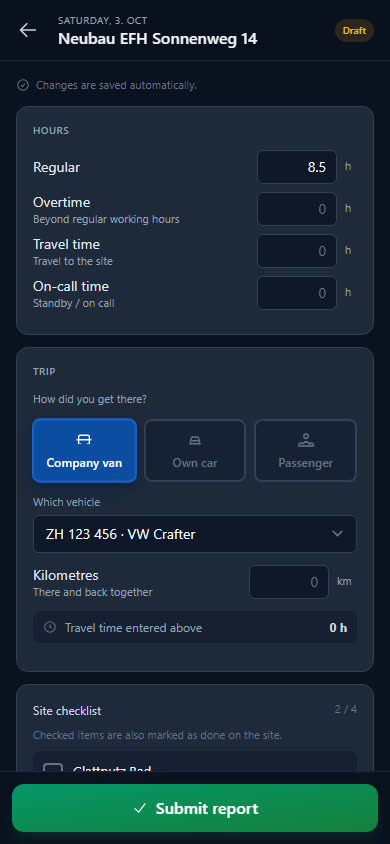
The employee records standby and call-outs as on-call time — separate from regular hours, overtime and travel time.
-
Defects with photos
Rating plate, faulty part, display on the unit: the photos are attached to the report, the description goes in the «Defects found» field.
-
Spare parts in the service van
Filters and consumables are kept in the vehicle storage. If something is missing, the employee reports it in the report for reordering.
-
Billing on time and materials
A property's reports produce the time-and-materials invoice with hours, travel time, on-call, kilometres and materials — as a Swiss QR-bill in PDF.
What belongs in the service van
Eight items for service: 50×50 cm ventilation filters, microfibre cleaning cloths and cleaning spray as consumables, toolbox, multimeter and LED torch as tools, plus work gloves and safety glasses.
- Ventilation filter 50x50cm
- Microfibre cleaning cloths
- All-purpose cleaning spray
- Service toolbox
- Multimeter
- LED torch
- Work gloves
- Safety glasses
Checklist per site
What needs doing on site is listed as a checklist on the site — your workers tick it off in the report. For example:
- Filters changed
- Rating plate photographed
- System back in operation after maintenance
- Customer informed about defects
Examples — you set the items yourself.
What businesses want to know first
Who is the profile meant for?
For businesses that maintain systems and look after properties — in the app it is called «Service / Maintenance (caretaker, HVAC & plumbing)». If you also install, add a second trade, for example Plumbing / Heating / Ventilation.
Does Baurapport remind me of the next service date?
No. The next date is a note in the report; it does not create a reminder. Baurapport sends reminders for vehicles: MFK, insurance and service.
Does the client get a service report?
Every report is available as a PDF with your logo, hours, materials, text and photos. The daily output fields — system no., readings, defects — are currently not in the PDF. Whatever the client should read therefore also belongs in «Work performed».
Can the caretaker report on several properties a day?
Yes. Each property is a site of its own with its own report. In the app, employees only see the properties they are assigned to.
Right for your business
Invoices
Time-and-materials invoice from the reports, Swiss QR-bill as PDF, payments and reminder levels.
Time tracking
Hours per site, overtime and holiday account, monthly statement for the accountant.
Plumbing
Pipe metres, taps and valves and pressure test in the report — new build and service in the same business.
Ready to go digital?
Try it free for 14 days — with your own team and your own sites. Then you decide.