Vehicle management for trade businesses
Licence plate, mileage, service, MFK and insurance of every vehicle in one place. Baurapport reminds you in good time — you, the office and the driver, on the phone too.
Record once, reminded in time
Record
Licence plate, type and mileage, plus the service interval in kilometres or months and the dates for MFK and insurance.
Assign
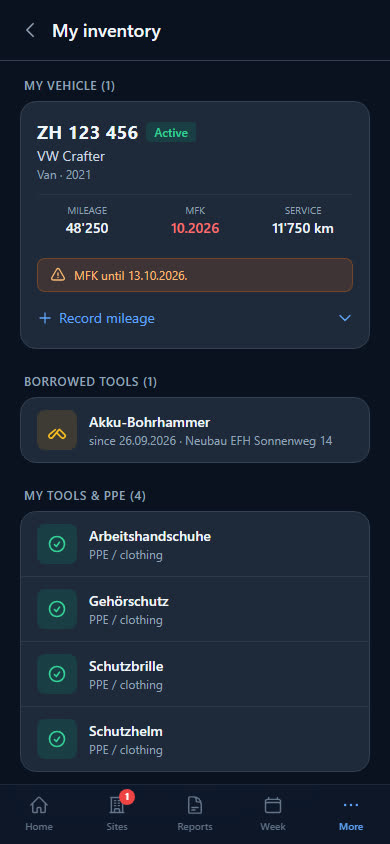
Each vehicle permanently to one person or to the pool. The driver sees it in their app and updates the mileage there.
Get reminded
MFK and insurance 30 days ahead, the service when it is due, planned appointments one week ahead — as a notification and push.
All vehicles at a glance
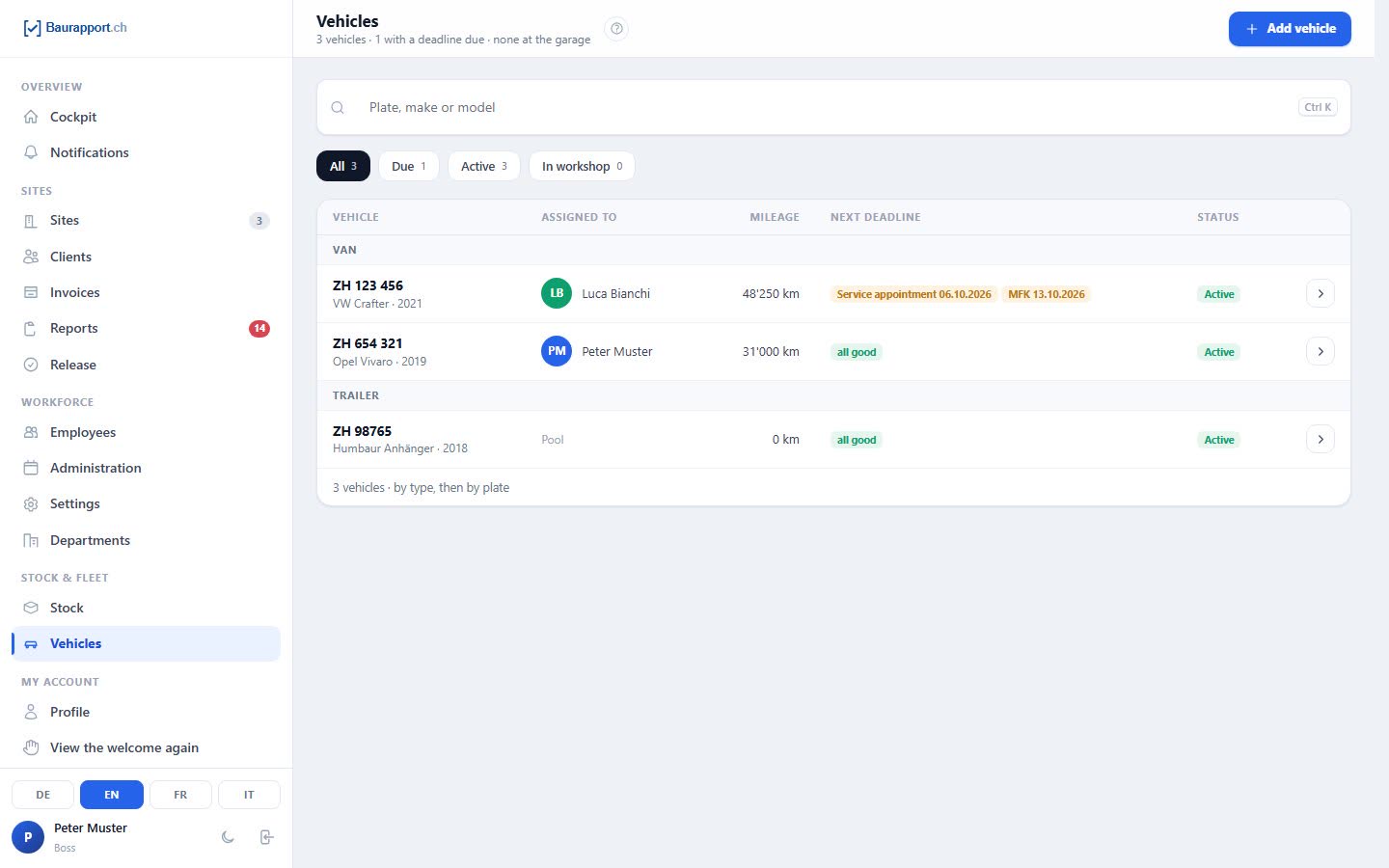
The list shows for each vehicle who drives it, the mileage and the next deadline. You filter what is due with one click.
-
From van to trailer
Licence plate, make, model, year of manufacture, type and photo. Status active, in the workshop or decommissioned.
-
Permanently assigned or in the pool
Anyone with the permission may assign vehicles — department heads only to people in their department. Every change is recorded in the history.
-
The vehicle is a store
What is on board, you keep as stock in the vehicle storage. Materials from the report can be deducted directly from there.
-
Due dates in the Cockpit
The Cockpit shows how many vehicles have an inspection due — right next to the items below minimum stock.
Never miss an MFK
Baurapport checks every day what is coming due and reports it to the boss, back office and driver — as a notification and as a push on the phone.
-
MFK and insurance
The first reminder comes 30 days before the date. Once it is dealt with — for example with the new MFK date — it moves to the archive by itself.
-
Service by kilometres or time
Once the interval is reached, by mileage or by months since the last service, Baurapport reports the service as due.
-
Appointments with a time
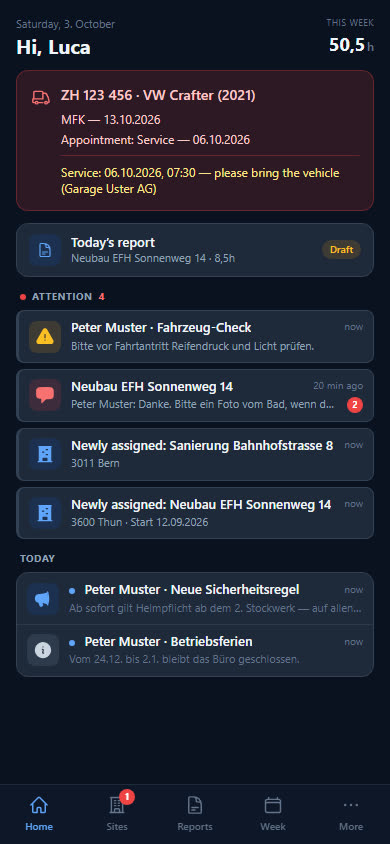
If the office schedules a workshop or tyre appointment, the driver gets a notification immediately — and a reminder one week before.
-
On the driver's home page
Due items and upcoming appointments are at the top of their app, with «please bring the vehicle» and the workshop.
The story of every vehicle
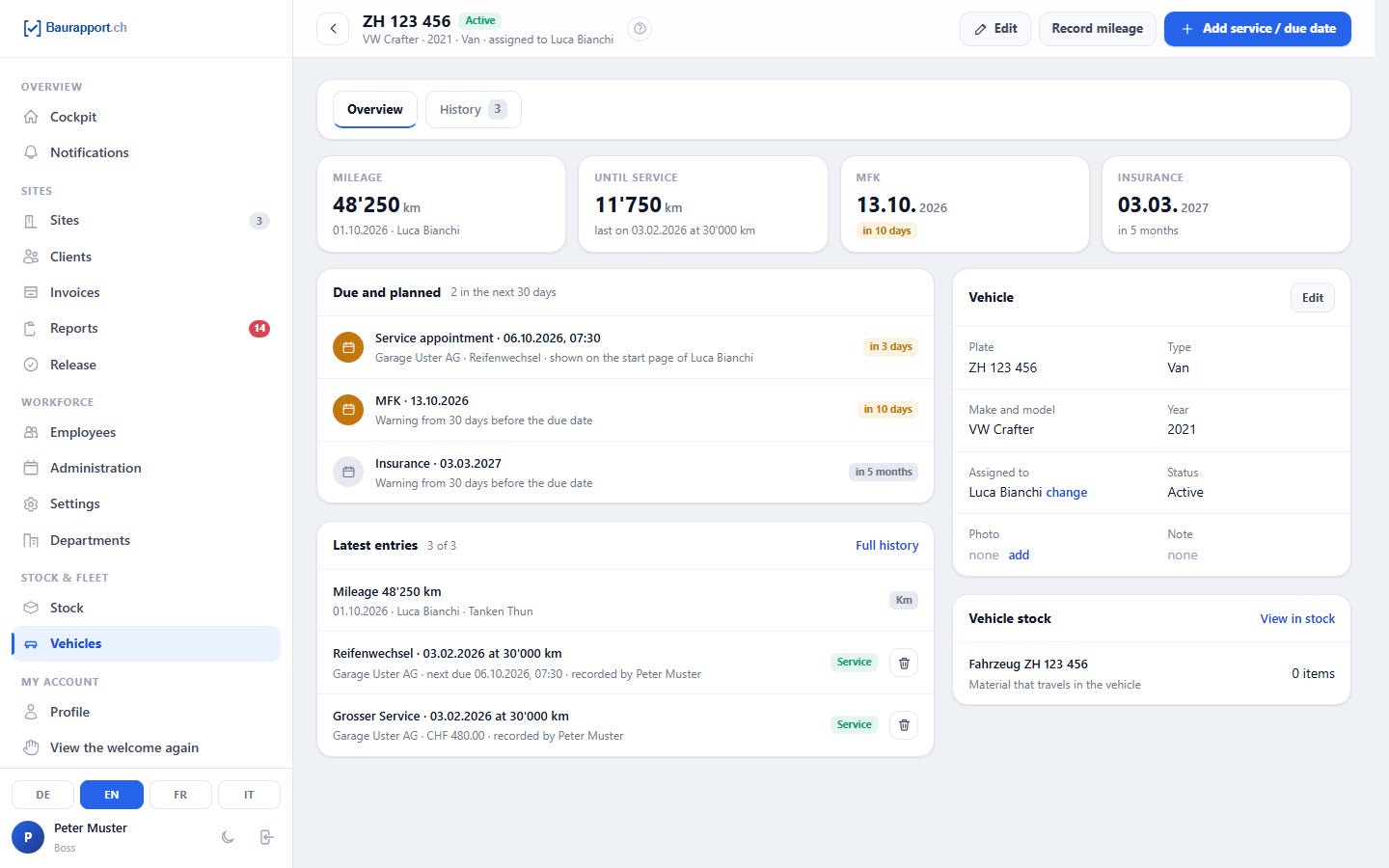
Service, repairs, mileage readings and assignments are listed chronologically in one history — each with the date and who recorded it.
-
Entries with workshop and costs
Service, repair, tyre change, MFK or insurance — with date, mileage, workshop, costs and the invoice as a file.
-
Deadlines update themselves
When you record a service, the date and kilometres are entered on the vehicle right away; an MFK or insurance entry sets the new deadline.
-
Mileage with history
Every reading with date and person — entered in the office or by the driver in the app.
-
Decommission instead of deleting
A vehicle you no longer have is decommissioned: it gets no more reminders, and the history remains.
What businesses want to know first
Does Baurapport keep a logbook?
No. It records mileage readings with dates as well as service and workshop. If you switch on the trip in the report, the employee records which company vehicle they took to the site and how many kilometres — that does not replace a logbook.
Does Baurapport show where a vehicle is right now?
No, there is no GPS tracking. You see who the vehicle is assigned to and its most recent mileage.
Do the reminders come by email?
No. They arrive as a notification in Baurapport and as a push on the phone, if notifications are switched on there — on the iPhone, Baurapport must be on the home screen for this. Recipients are the boss, back office and the driver.
Who enters the mileage?
The office or the employee to whom the vehicle is permanently assigned — in the app under «My inventory». If the service interval is stored in kilometres, the due date is based on this reading.
Can I analyse costs per vehicle?
No. You record costs for each service or workshop entry and attach the invoice as a file; there is no analysis across all entries. Baurapport does not track fuel costs or leasing.
Is vehicle management included in every plan?
Yes. All plans include all features; the price depends on the number of users. The prices are published openly, and you can try it free for 14 days.
More features and templates
Stock and tools
Stock per storage location and vehicle, tool lending, reordering from the report.
Report app
Hours, materials and photos from the phone — in the office the same day, as a PDF and for payroll.
Invoices
Time-and-materials invoice from the reports, Swiss QR-bill as PDF, payments and reminder levels.
Ready to go digital?
Try it free for 14 days — with your own team and your own sites. Then you decide.