Report app for painting businesses
How many square metres were painted, how many coats, in which colour and whether primer was applied: it is all in the day's report — not on a slip of paper in the van.
What the report asks painters
The profile «Painter / Decorator» adds four fields under «Daily output» to every report. None is mandatory — fill in whatever applies that day.
The area painted that day.
Whether it was painted once or three times is recorded as a number.
Colour code, gloss level or your own mix — for touch-ups months later.
Whether the surface was pre-treated is recorded as a tick — not just in someone's memory.
From masking to handover
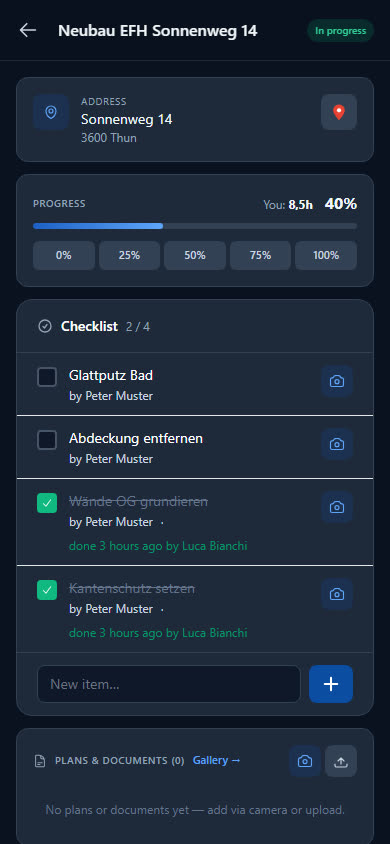
What needs doing is in the site checklist. How far the work has got is shown by the progress.
-
The mix stays easy to find
The colour is in the day's report. If a wall needs touching up, you look it up in the site's reports — instead of searching the van for the right bucket lid.
-
Checklist and progress
The employee ticks off items such as «Prime walls upper floor». They set the progress in the app in steps of 25 per cent; at 100 per cent the site is completed.
-
Paint from stock
The employee chooses used buckets and masking material from stock. If the boss switches on deduction, the stock goes down with every report.
-
Before and after photos
Cracks before filling, the finished wall afterwards: the photos are attached to the report and collected in the site gallery.
Ten items to get started
The starter pack for painters brings wall paint, deep primer and masking material, brushes and rollers, plus paint tray, ladder, respirator and overalls. The wall paint starts with a minimum stock of 5 buckets; if there are fewer, the Cockpit counts it among the items below minimum.
- Wall paint white matt 15L
- Deep primer interior 10L
- Masking tape 50mm
- Protective fleece 1x50m
- Paint roller 25cm
- Ladder 8 steps
- Respirator mask A2
- Painter's overalls
Checklist per site
What needs doing on site is listed as a checklist on the site — your workers tick it off in the report. For example:
- Floor, windows and sockets covered
- Cracks filled and sanded
- Primer dry before the first coat
- Masking removed, room cleaned
Examples — you set the items yourself.
What businesses want to know first
Can I record the areas painted?
Yes. Under «Daily output» the employee enters the area painted in m², plus the number of coats, the colour and whether primer was applied. The details are in the report and in its view in the office.
Where do I record the colour?
In the «Colour / mix» field, a free text field — for a colour code, the gloss level or your own mix. It belongs to the day's report and stays saved there.
Does the app calculate how much paint I need?
No, Baurapport does not calculate quantities. The employee enters what was used as material in the report — chosen from stock or typed in freely.
Does the profile also apply to decorators?
Yes, in the app it is called «Painter / Decorator». The fields are the same: area, coats, colour and primer.
Ready to go digital?
Try it free for 14 days — with your own team and your own sites. Then you decide.