Stock management for trade businesses
Materials, tools and protective equipment with stock levels per storage location — in the central warehouse, in further stores and in every vehicle. What is used or missing on site comes straight from the report.
Set up, book, reorder
Set up
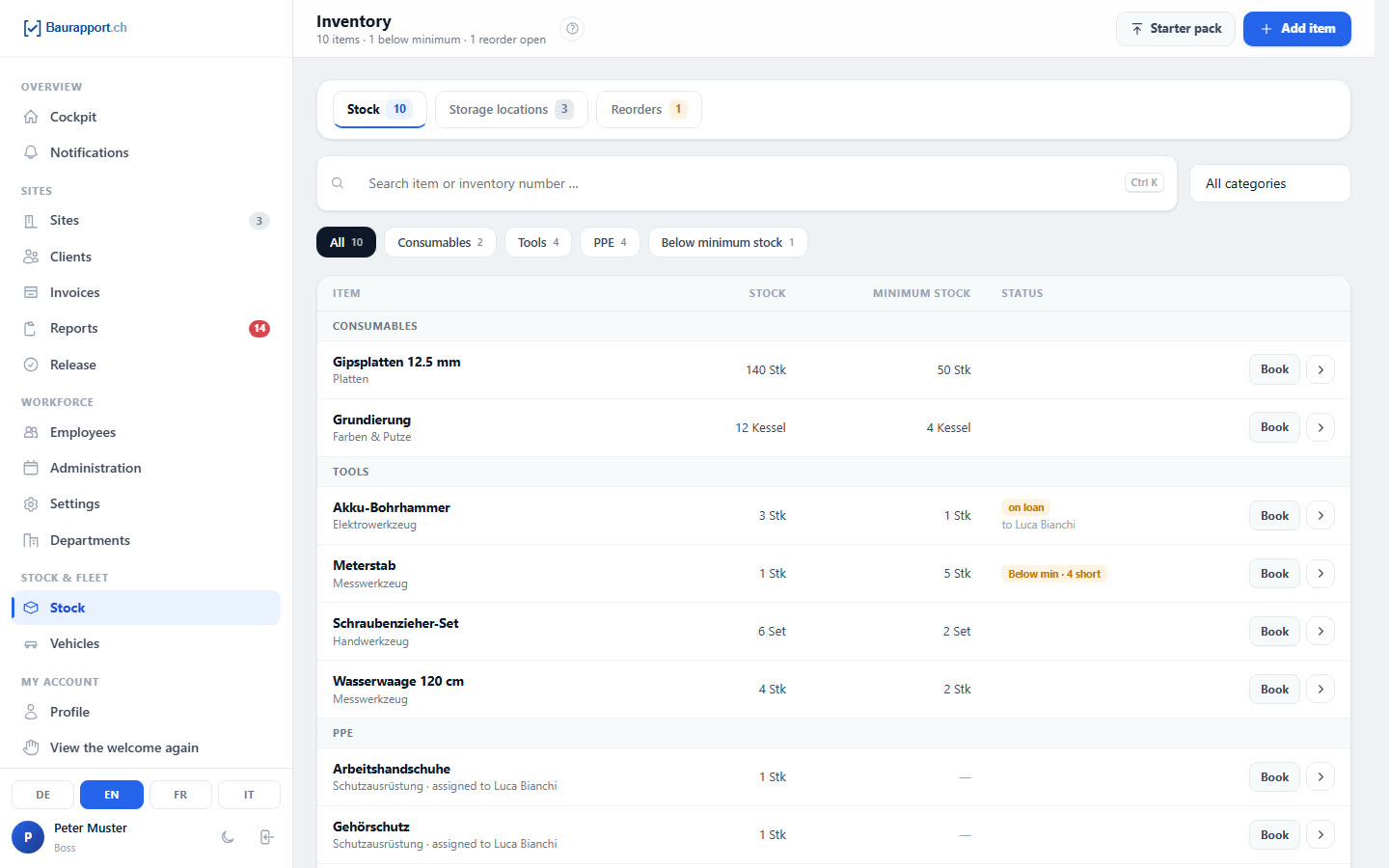
Create storage locations and add items: consumables, tools or PPE, with unit and minimum stock. To get started there is a template for each trade.
Book
Inflow, outflow, stocktake and transfers between storage locations and vehicles. Every booking appears in the history with person, reason and new stock level.
Reorder
What is missing on site, the employee reports in the report. In the office it stays on the reorder list until you tick it off as ordered.
Know what is where
The stock of every item is kept per storage location: in the central warehouse, in further stores and in every vehicle. You see at a glance what is running low.
-
Storage locations and vehicles
Central warehouse, outdoor store or container — with address and person responsible. Every vehicle is automatically a store of its own.
-
Bookings with history
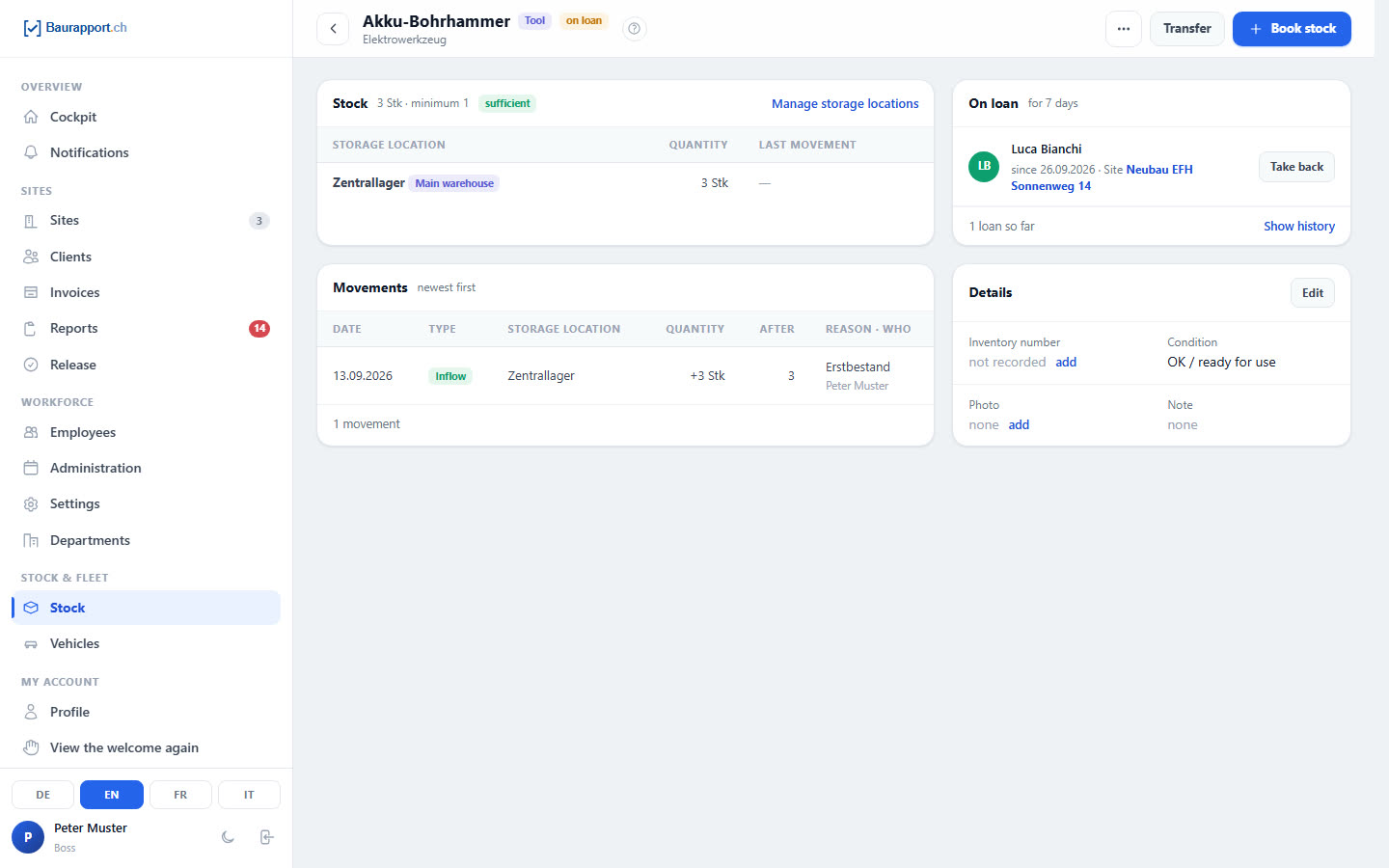
Inflow, outflow, stocktake and transfer — the last 50 movements per item are listed in the history with date, person and reason.
-
Minimum stock at a glance
Items below the minimum are marked, can be filtered with «Below min» and appear in the Cockpit — together with the quantity that is missing.
-
Three kinds of items
Consumables, tools and PPE, each with unit, category, inventory number, photo and, if you wish, sales price.
Materials from the report
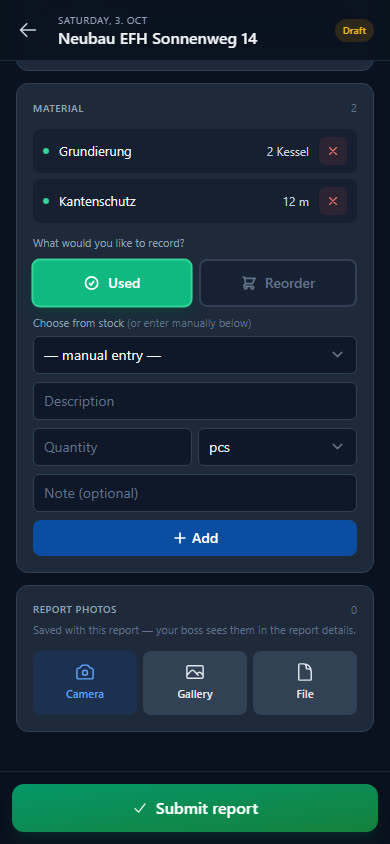
Your team writes down in the report anyway what they used and what is missing — this produces the reorder list and, if you want, the stock booking. If you are starting on paper, use the free material report template.
-
Choose from stock
In the report, the employee picks the item from stock or types it in freely. If it is chosen from stock, the time-and-materials invoice takes over the sales price right away.
-
Deduct if you want
When switched on, used material reduces the stock — from the employee's vehicle, otherwise from the central warehouse. If the line is deleted, Baurapport books it back.
-
Reorder list
The employee reports what is missing directly in the report. In the office it appears on the list with site, date and who reported it; one click on «Ordered» ticks it off.
-
Analyse consumption
The Cockpit shows the most-used materials in the chosen period, and the site export shows consumption per site if you wish.
Who has the hammer drill?
You lend tools to a person and take them back with their condition noted. Things someone has permanently — their own machine, their protective equipment — you assign to them for good.
-
Lending with site
To whom, since when and for which site, with a comment if you wish. Department heads only lend to people in their department.
-
Return with condition
OK, in repair or defective: the condition is recorded when the item is taken back. The history shows who had the device and when.
-
PPE permanently assigned
You permanently assign a helmet, hearing protection or safety shoes to one person — tools too.
-
My inventory in the app
Every employee sees on the phone their vehicle, their borrowed tools and their permanently assigned equipment.
What businesses want to know first
Can I scan items with the phone?
No, there is no barcode or QR scanning. In the office you find items by name or inventory number; in the report the employee chooses them from the stock list.
Does Baurapport order from the supplier?
No. The reorder list is your internal reminder list: the employee reports what is missing in the report, and in the office you tick it off as ordered. Baurapport does not manage suppliers, orders or purchase prices.
Can I import my items?
There is no import from Excel or CSV. To get started there is a template for each trade with typical materials, tools and PPE, which you take over with one click; you then book the stock levels yourself.
Does Baurapport warn me when stock falls below the minimum?
Not by push or email. Items below the minimum stock are marked in the list, can be filtered with «Below min» and appear in the Cockpit in the «Stock» box. What counts is the total stock across all storage locations.
Can I lend out several identical devices individually?
Yes, if each device is recorded as an item of its own — ideally with an inventory number. Lending and permanent assignment always apply to a whole item. More on this in the guide Keeping track of tools.
Is stock management included in every plan?
Yes. All plans include all features — stock, tools and vehicles included; the price depends on the number of users. The prices are published openly, and you can try it free for 14 days.
More features and templates
Vehicles
Service, MFK and insurance with reminders, mileage and assignment.
Report app
Hours, materials and photos from the phone — in the office the same day, as a PDF and for payroll.
Invoices
Time-and-materials invoice from the reports, Swiss QR-bill as PDF, payments and reminder levels.
Ready to go digital?
Try it free for 14 days — with your own team and your own sites. Then you decide.