Report app for plasterers and drylining
Your team records on the phone how many square metres were plastered or filled today, how thick and with which plaster — right next to hours, materials and photos. In the office the report is ready as soon as it has been submitted.
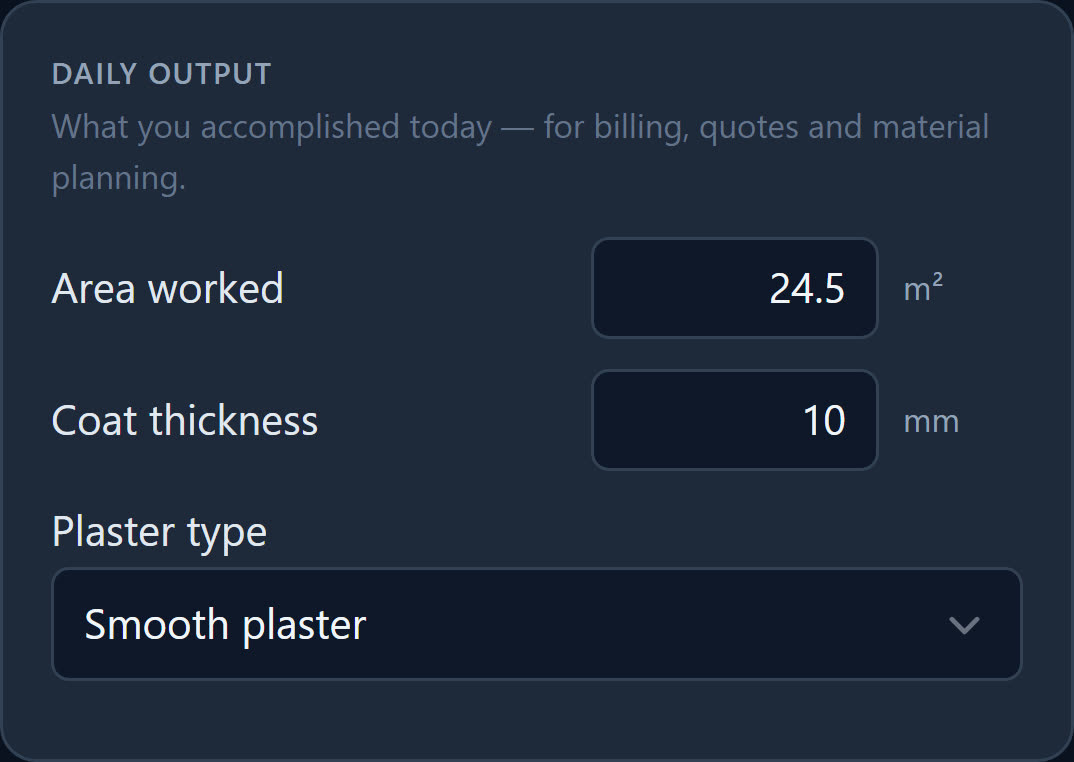
Three fields for the daily output
With the profile «Plasterer / Plasterboard / Interior fit-out», every report shows these three fields under «Daily output». The values are saved as you type; in the office they appear in the report view.
What was plastered or filled today.
How thick it was applied, in whole millimetres.
One tap instead of a sentence — and written the same way by everyone in the team.
Room by room, without slips of paper
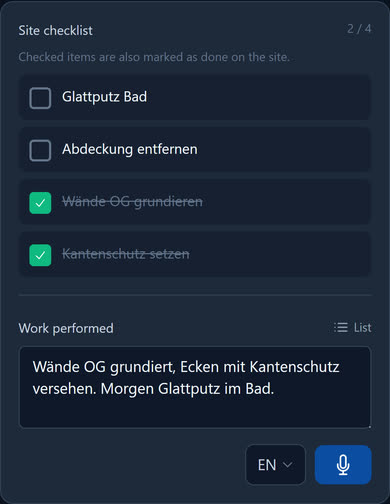
One report per person, site and day. What needs doing on the site is in its checklist — and ticked off in the report.
-
The site checklist
The employee ticks off items such as «Fit corner beads» or «Smooth plaster bathroom» in the report. On the site they are then marked as done — with name and time.
-
Reordering plasterboard
When the boards run out, the employee enters them in the report under «Reorder». In the office the request appears with site and name in the list of reorders.
-
Photos before closing up
What disappears behind the boarding, the employee photographs in the report. All the pictures of a site are also kept in its gallery.
-
Arrangements in the chat
When the boards will be delivered is in the site chat — where everyone assigned can read it.
The starter pack for plasterers
In stock management, Baurapport suggests nine typical items, from plasterboard to dust mask. A preview shows them all, and one click creates them with a stock of 0. The plasterboard starts with a minimum stock of 10 pieces: if stock falls below that, the stock list marks the item.
- Plasterboard GKB 12.5mm
- Jointing compound, fine
- Glass-fibre corner bead
- Drywall screws
- Finishing trowel 30cm
- Mortar bucket 30L
- Dust mask FFP2
- Safety glasses
Checklist per site
What needs doing on site is listed as a checklist on the site — your workers tick it off in the report. For example:
- Corner beads fitted on all external corners
- Joints filled and sanded
- Windows and floor covered
- Room handed over swept clean
Examples — you set the items yourself.
What businesses want to know first
Can I record how many square metres were plastered today?
Yes. Under «Daily output» there is the field «Area worked» in m², plus the coat thickness in millimetres and the plaster type from a list. In the office the values appear in the report view.
Does the profile also suit drylining?
Yes, in the app it is called «Plasterer / Plasterboard / Interior fit-out». That is why the starter pack also includes GKB 12.5 mm plasterboard and drywall screws. If you also do painting work, tick Painter as an additional trade under Company.
Does Baurapport calculate the invoice from the square metres?
No. The time-and-materials invoice is created from the hours, travel time, kilometres and materials in the reports. If you bill by area, add the square metres to the invoice as a separate item with quantity, unit and price.
Can I change the trade later?
Yes. The boss or back office change it under Company. Reports already recorded keep their fields; new reports start with the fields of the new trade.
Right for your business
Report app
Hours, materials and photos from the phone — in the office the same day, as a PDF and for payroll.
Stock and tools
Stock per storage location and vehicle, tool lending, reordering from the report.
Painter
Area painted, coats and colour in the report — you can still find the mix later.
Ready to go digital?
Try it free for 14 days — with your own team and your own sites. Then you decide.